What's new
Every feature, fix and change we ship to NotionStats.
October 2026
Smoother Notion Connection + Refreshed Site ✨
Connecting Notion and setting up a workspace is now quicker and less error-prone, and the NotionStats site has had a refresh.
🔗 A smoother Notion connection #
- After you connect Notion, you land straight on your workspace page and we pick up the databases you shared automatically, selecting your primary database when there's only one obvious choice.
- If you cancel or something goes wrong on the way back from Notion, you return to your workspace with a prompt to reconnect, instead of a dead end.
- We now warn you if you connect a different Notion workspace than the one you used before.
- If you haven't shared any databases with NotionStats yet, we tell you what to do next.
🗂️ Easier workspace creation #
- Creating a workspace from a template starts on the matching database when your Notion database has the expected name.
- Workspace names are generated automatically and made unique, and duplicate names now show a clear message.
- The chart editor's previews now use the full height of larger screens.
🎨 A refreshed website #
- Redesigned home, features, and templates pages, with new screenshots and demo clips showing how a database becomes a dashboard.
- Guides and FAQs updated to match the new workspace and Notion connection flow.
- Old feature page links now take you to the matching section of the new Features page.
September 2026
Request Features and Vote on What We Build Next 🗳️
You can now post feature requests and bug reports directly from your dashboard — and vote on the ones you want to see built.
What's new #
- A feedback board where you can browse and vote on ideas from other users.
- A thread view for each request, so you can follow along and add comments.
- Votes help us prioritize what we build next.
This is a paid feature — open the feedback board from your dashboard to get started.
A Redesigned Dashboard 🧭
We've rebuilt the dashboard's navigation and settings from the ground up.
🧭 New sidebar and workspace pages #
- A new dashboard sidebar makes it easier to jump between workspaces, charts, calendars, and milestones.
- Workspace and "All Workspaces" pages now group your charts, calendars, and milestones together, with clearer empty states when there's nothing there yet.
⚙️ Settings, reorganized #
Settings are now split into focused tabs — including a dedicated tab for managing your Notion connection — instead of one long page.
📱 A better mobile experience #
Menus and dialogs that used to pop up as centered windows now slide up from the bottom on smaller screens, which is easier to use one-handed.
August 2026
New Milestone Metrics + More Free Templates 🎯
🎯 New milestone metrics for prop-firm traders #
Milestones now support trading-days and drawdown-limit tracking, plus new prop-firm challenge templates split out from the general trading templates — so you can track a funded-account challenge the way it's actually structured.
🆓 More templates on the Free plan #
We've expanded what's available on the Free plan across charts and milestones, and Free users can now switch between free templates directly from the editor instead of starting over.
💳 Clearer pricing #
We also replaced the old pricing cards with a single comparison table, so it's easier to see what's included at each plan side-by-side.
July 2026
Faster Embeds + Smarter Workspace Setup ⚡
We've been working under the hood to make NotionStats faster and smoother to set up.
⚡ Snapshot-backed embeds #
Your chart, calendar, and milestone embeds now read from a cached snapshot instead of hitting the Notion API on every view — so embeds load faster and hold up better when a lot of people are viewing them at once.
🔍 Smarter workspace setup #
- Improved how NotionStats detects your Notion database type when you connect a new workspace, so auto-detected templates match what's actually in your database more often.
- Databases we don't recognize now suggest supported workspace types instead of leaving you guessing.
- Fixed a few edge cases where embeds showed zero values instead of your real data.
June 2026
Filters for Calendars and Milestones
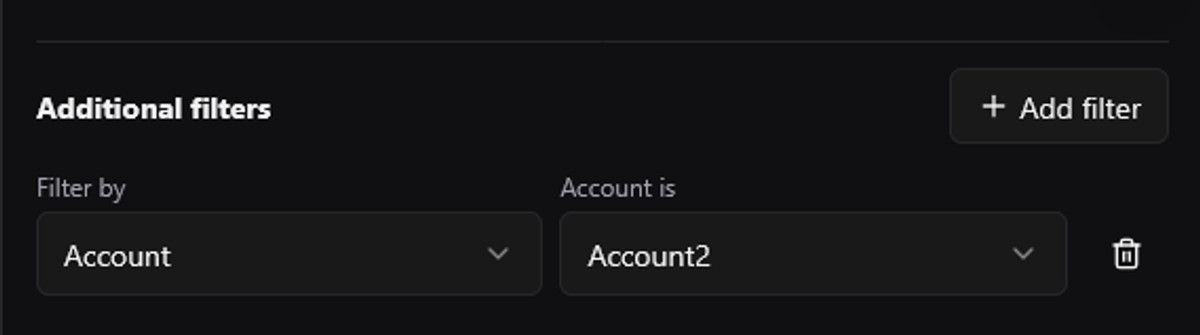
You can now add filters to calendars and milestones, just like you already can with charts.
What's New #
- Filter calendar data by select, multi-select, checkbox, and date properties.
- Filter milestone progress so each tracker can focus on a specific setup, strategy, market, or tag.
- Saved filters apply to both your editor preview and embedded Notion views.
- Date filters support relative ranges like this week, this month, and this year.
Use filters to create more focused views, such as a calendar for one strategy or a milestone tracker for a specific trading setup.
April 2026
🏃 Cardio Analytics for fitness template
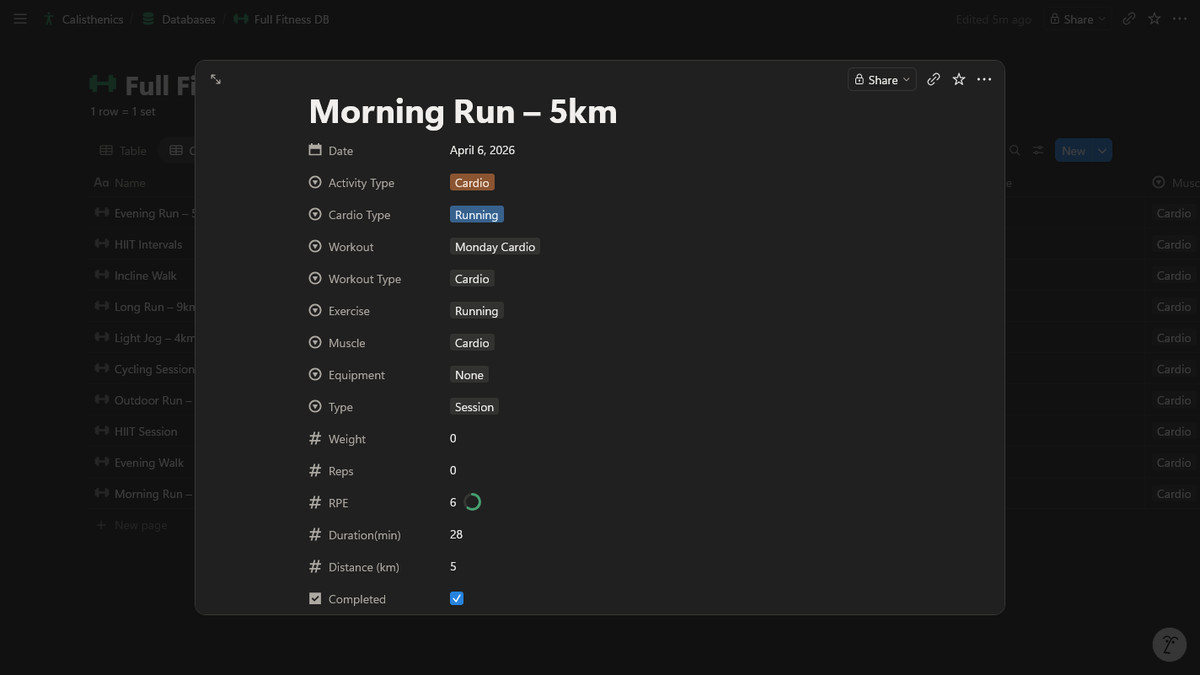
You can now turn your cardio logs in Notion into clean cardio analytics in NotionStats — so it’s easy to spot trends in time, distance, and consistency.
What’s Included #
- Cardio Overview: total minutes, total distance, sessions, and average session duration.
- Weekly Cardio Duration: total minutes per week.
- Weekly Cardio Distance: total distance per week.
- Cardio Consistency: calendar view of cardio sessions by day.
- Pace Trend: follow pace changes over time (when your database includes distance + duration).
Get Set Up #
On the Dashboard, click Add Workspace (or edit an existing workspace) and set:
- What do you use this workspace for? → Fitness
In your workout database, make sure you have:
- Activity Type (Select): include Cardio (and optionally Strength if you track both)
- Duration (Number): minutes
- Distance (Number): kilometers
Then mark cardio rows with Activity Type = Cardio and use cardio templates in Charts (or cardio milestones if you track goals).
📈 Subscriptions Tracker Analytics
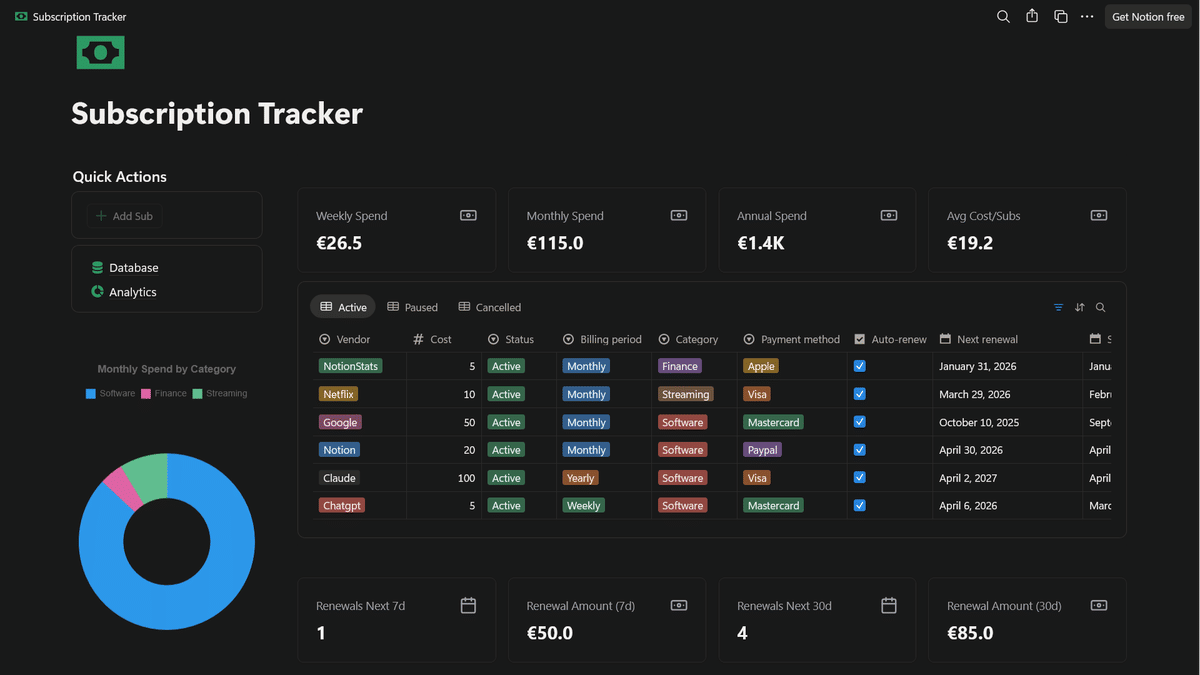
You can now track subscriptions in Notion and get clean analytics in NotionStats — from spend breakdown charts to renewal insights, plus milestones to keep goals visible.
What’s Included #
- Charts: monthly spend normalization, renewals (next 7/30 days), renewal heatmaps, and breakdowns by Category / Vendor / Payment Method.
- Milestones: use your subscription data to set targets and track progress over time.
- Ready-to-duplicate Notion template: a complete Subscriptions Tracker you can copy into your Notion and start using immediately.
Get Set Up #
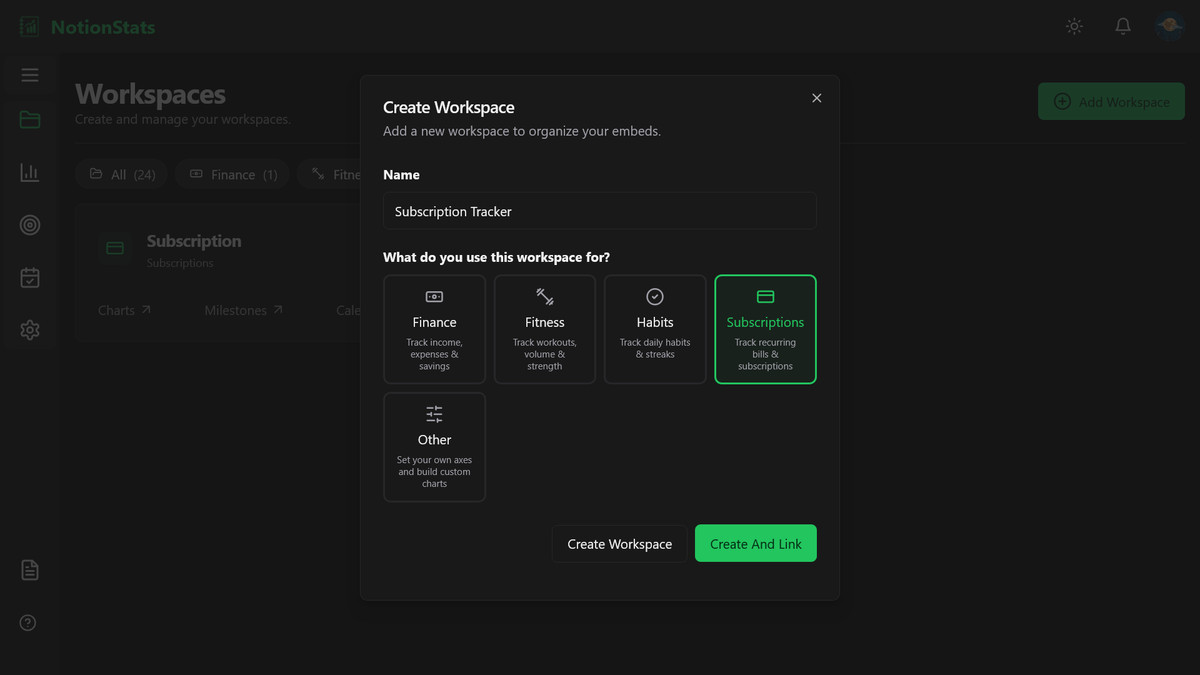
On dashboard page, click Add Workspace button and set What do you use this workspace for? → Subscriptions.
Already have a subscriptions tracker in Notion? Check out the guide to see how to update your database to get the best analytics. Setup guide
Don’t have one yet? Duplicate the ready-to-use template and start tracking immediately. Duplicate the template
March 2026
Fitness, Habit templates 📊
📊 More Templates support #
NotionStats now supports Fitness and Habit templates, plus you can build a chart from any Notion database using the Settings tab.
What's New #
Fitness & Habit templates #
- Fitness – Volume per muscle group, workout trends, and more, with sample chart templates ready to use.
- Habit – Habit heatmaps, streaks, and completion analytics with strict or flexible tracking.
- Sample Notion templates – Duplicate our Fitness Tracker and Habit Tracker Notion templates (plus the existing Finance Tracker) from the Templates page to get started quickly.
Workspace type #
- When you create or edit a workspace, you now select what it's for: Finance, Fitness, Habit, or Other. This ensures the right templates and settings are offered for each workspace.
Your existing finance charts and templates are unchanged.
👉 Browse templates ·
February 2026
Custom Colors for Your Charts 🎨
🎨 Pick Your Own Chart Colors #
You can now customize colors on your charts so they match your brand or preferences.
What You Can Do #
- Line, Area & Radar – Choose a single chart color.
- Bar & Horizontal Bar – Set a positive color and a negative color (e.g. green for gains, red for losses).
- Pie, Doughnut & Half-Donut – Use the default palette as-is, or click any color to edit it. Add more colors or remove them to build your own palette.
Changes apply live in the chart preview and are saved when you save the chart.
January 2026
View Your Profile in Settings! 👤
You can now view and manage your profile directly from the Settings page!
What's New #
We've added a dedicated Profile section to your Settings page, giving you quick access to your account information.
Features:
- View your account details at a glance
- Easily access your profile information in one place
New Milestone Templates Are Here! 🎯
🎯 Track Your Financial Goals with New Milestone Templates #
We've added 9 ready-to-use milestone templates to help you track your financial progress right out of the box!
📊 What's New #
Savings & Income Tracking #
- Monthly Net Savings – Track how much you're saving each month
- Annual Savings Target – Monitor progress towards your yearly savings goal
- Monthly Income Target – Track your monthly income against a target
- Savings Rate – See what percentage of your income you're saving
Expense Management #
- Monthly Spending Cap – Keep your expenses within budget
- Expense-to-Income Ratio – Maintain a healthy balance between spending and earning
Consistency Goals #
- Transactions Logged – Track how consistently you log income and expenses
- No-Spend Days – Count days with no expenses this month
- Expense-Free Streak – Challenge yourself to consecutive days without spending
🚀 Try Them Now #
Head over to your Milestones dashboard and create a new milestone to see all available templates.
Turn your Notion databases into live analytics.
Charts, calendars and milestones that stay in sync — embedded straight back into the Notion pages you already work in.
Start free